Compare the 5 best Telegram bots and their key features, to download Instagram videos and Reels?
You scroll past a Reel that shows exactly the recipe, workout or travel tip you needed, and you want to keep it. Then you notice that Instagram gives you no download button. Saving it inside the app only bookmarks it, and the moment the creator deletes the post, it is gone.
That is why so many people turn to Telegram bots, which let you paste a link into a chat and get the video back in seconds, with no extra app to install. If you would rather skip Telegram altogether, a browser tool like Snapgram does the same job on any device.
In this guide, you will see how online downloading works, a quick phone tutorial, and five Telegram bots worth trying.
Downloading is handy for watching offline on a flight, keeping a backup of your own content, collecting reference clips for a project, or sharing a clip with a friend who does not use Instagram. Whatever your reason, the options below are all free to try and easy to use.
Download Instagram Videos Online
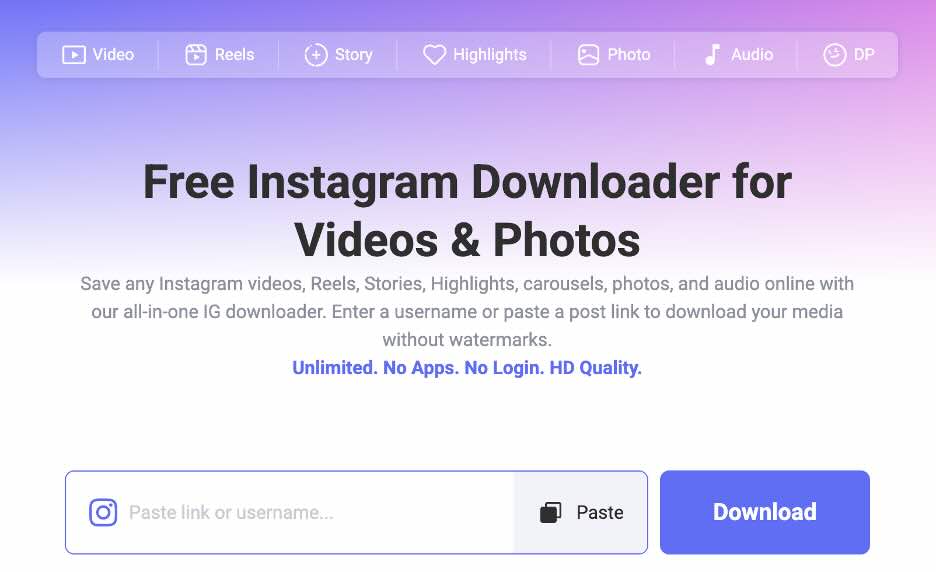
Before looking at bots, it helps to know the simplest option, which is a web based downloader. Snapgram is a free tool that works in the browser on Android, iPhone, Windows, Mac and Chrome, so you do not install anything or create an account. It covers all common types of Instagram media, and the service describes itself as 100% free with no download limits. Here is what stands out:
– All Content Types: Saves videos, Reels, Stories, Highlights, carousels, photos and profile pictures from public profiles.
– Works on Every Device: Open it in a phone, tablet or desktop browser. You can also add it to your home screen for quick access.
– No Login Required: You never enter your Instagram password, so your account stays out of the process.
– 100% Free, No Limits: The site says there are no ads and no caps on how many files you can download.
If you mainly want clips, the Instagram video downloader lets you paste a post link and save the file as an MP4 with its original audio. For short vertical videos, the instagram reels downloader is built for Reels and saves them in Full HD 1080P without a watermark. If you only need the soundtrack, it can also extract audio as an MP3 or M4A at 320 kbps. The download service can delete download history from its servers within 24 hours.
Because everything happens in the browser, there is no bot to wake up and no chat history to dig through. That makes it a solid fallback whenever a bot stops responding.
Easy Guide to Download Instagram Videos on Phone
Whether you use a bot or a website, the process on a phone is almost identical. Follow these four steps:
– Step 1. Copy the Video Link.
Open the video or Reel in the Instagram app, tap the share icon, and choose Copy link.
– Step 2. Open Your Downloader.
Open Snapgram in your phone browser, or open the Telegram bot you picked and tap Start.
– Step 3. Paste the Link.
Paste the copied link into the search box or the chat, then send it or tap the download button.
– Step 4. Save the File.
Choose the format you want and save it. The file goes to your gallery or Downloads folder, and in Telegram you can also tap the video and choose Save to Gallery.
Only download content you created or have permission to use, and respect the rights of the people who made it.
Top 5 Telegram Bots for Instagram Videos Downloads
Telegram bots are small automated accounts that live inside a chat. For Instagram, the idea is simple: you send a post link, and the bot replies with the file. To build this list, we checked each bot’s own Telegram page and, where available, the developer or directory page, and we only describe features that those pages state. Bots can change or go offline at any time, so treat this list as a starting point and test each one with a public post.
1. Hitube Telegram Bot
Hitube is a free online downloader for videos, photos and audio from social media, and it also has a Telegram bot, @snaptube_video_download_bot, listed as Snaptube Downloader. The bot handles IG downloads, TikTok downloads and Facebook downloads, with more sites supported. It is a good pick if you want one bot for several platforms instead of an Instagram only tool.
– Instagram Support: It’s an IG download bot, so you can send Instagram links straight to it.
– Multi Platform: Also covers TikTok, Facebook, Twitter, Pinterest and other sites.
– Website Behind It: Free and needs no signup and supports MP4 and MP3 downloads, with qualities up to 4K depending on the source.
– Android App: Hitube also offers a free Android app, which supports 50+ sites and bulk downloads.
To use it, search for the bot name in Telegram, tap Start, and send the link of the Instagram post. It is a sensible first choice if you want something simple that also handles short clips from other apps. Because Hitube also offers a website and an Android app, you can switch tools whenever a chat is not convenient.
2. InstaSave: Instagram & TikTok Downloader
This bot, found at @instasave_bot, is built for quick link based downloads. Its Telegram page says you can download Instagram Reels, posts and Stories, and that it also works with TikTok, X, Facebook and Pinterest. It is described as free, and the page shows more than 61,000 monthly users, which suggests a fairly active user base.
– Reels, Posts and Stories: The bot’s page lists all three Instagram content types.
– Other Platforms: Also supports TikTok, X, Facebook and Pinterest, so one chat can cover several apps.
– Free to Use: The bot’s description presents it as free.
– Active Audience: About 61,000 monthly users are shown on its Telegram page.
To use it, open the bot, press Start, and paste the post link. It works best as a no fuss option for quick, occasional downloads, and it is easy to keep pinned in your chat list next to the others.
3. INSTASAVE
Not to be confused with the bot above, INSTASAVE is a separate bot at @instasavebot, titled INSTASAVE: Instagram download, Images, Videos, Reels. Its description is short and clear: it helps you download stories, images and videos from Instagram, and you just paste the URL and get what you need. That simplicity is the main appeal for anyone who dislikes menus and settings.
– Paste and Get: Send the URL, and the bot returns the media, with no extra steps described.
– Stories, Images and Videos: The page lists all three types, and the bot name also mentions Reels.
– Instagram Focused: The name and description center on Instagram rather than many different platforms.
To use it, open the bot, tap Start, and send the link. Since the description is so short, expect a basic experience that focuses on getting the file to you.
4. Save As Bot
Save As Bot, at @saveasbot, runs as a Telegram mini app. According to its MiniTelegram listing, you send the bot a post link and it returns original photos, videos, stories or text within seconds. The listing calls the process fully automated and says it needs no extra software or outside registration. It names Instagram, Pinterest and TikTok as examples of the networks it supports, and it shows about 4 million monthly users.
– Mini App Format: Runs inside Telegram as a mini app, so it feels like a small app without installing anything.
– Original Quality Media: The listing says it returns original photos and videos.
– Fully Automated: The listing says no registration or extra software is needed.
– Very Large User Base: The directory page shows roughly 4 million monthly users.
To use it, open the bot, tap Start, and send the link. Because it runs as a mini app, the layout may feel a little different from a plain chat bot, which some people find tidier.
5. Facebook & Instagram Video Downloader
The last bot on our list, @fbinstadownloader_bot, covers two platforms at once. You can download Facebook and Instagram videos, Reels and photos instantly, and the bot is fast, simple and free to use. If you save content from both Facebook and Instagram, having a single chat for both is convenient.
– Videos, Reels and Photos: The bot’s description lists all three media types.
– Two Platforms: Handles both Facebook and Instagram links in the same chat.
– Fast and Simple: Quick and easy, with free access.
To use it, open the chat, press Start, and paste either an Instagram or a Facebook link. It suits people who save videos from both networks and want to avoid switching between different bots.
Which Bot Should You Choose?
The right pick depends on what you save. If you download from several platforms, the Hitube bot or InstaSave (@instasave_bot) cover more than Instagram. If you only care about Instagram posts, INSTASAVE keeps the experience focused. If you like mini apps and a large community, try Save As Bot. If you also save Facebook videos, the Facebook and Instagram bot saves you a second chat. A good habit is to test a bot with a short public Reel before trusting it with something important.
A Quick Note on Using Telegram Bots
All five bots work in the same basic way: open the bot, tap Start, paste a link, and wait for the file. Since bots are run by independent developers, the experience can differ from one to another, so it is worth keeping two or three of them saved in your chat list. If one is slow or offline, you can switch to the next without losing time.
Conclusion
Telegram bots make it quick to save Instagram videos and Reels, and the five above are all easy to try for free. Hitube’s bot suits people who want several platforms in one place, the two InstaSave bots keep things simple, Save As Bot offers a mini app experience, and the Facebook and Instagram bot is handy for both networks. Still, every bot depends on Telegram and on a developer who keeps it running.
If you want a steadier option, Snapgram is the one we recommend. It runs in the browser on Android, iPhone, Windows, Mac and Chrome, needs no login or Telegram account, saves Reels in Full HD without a watermark, and is free with no limits. Paste a link, tap download, and your video is ready in your gallery. Try it with your next favorite Reel, and keep one bot as a backup for the days you prefer Telegram.